 Voiceturi
Homework your students
can hear themselves do.
Build the exercises you would set in a lesson, share them as one QR code, and your students practise between lessons with the app showing them, note by note, whether they hit it.
- Runs in your browser
- No account needed
- Mic audio stays on your device
Why practice between lessons slips
The lesson goes well. The week after it is where progress is made or lost, and at home nobody tells a student that the third note was flat. So they either practise the mistake or stop practising.
Voiceturi listens instead. A singer sees their pitch as a line over the notes while they sing, with a score for every take. A pianist can be scored through the microphone or a MIDI keyboard. A guitarist plays along with the tab and a fretboard that light up on each note.
Build the exercises you would set
- For a voice: a scale or arpeggio from any note, up or down, at the tempo you choose; a melody placed note by note on a grid; or sing a phrase and the app writes the notes down. Breathing drills too: box breathing, Farinelli, hissing blocks.
- For piano and guitar: place the notes on a keyboard, or import a MIDI file.
- From the library: add any of the app’s own exercises next to yours, in the order you want.
Share it in one step
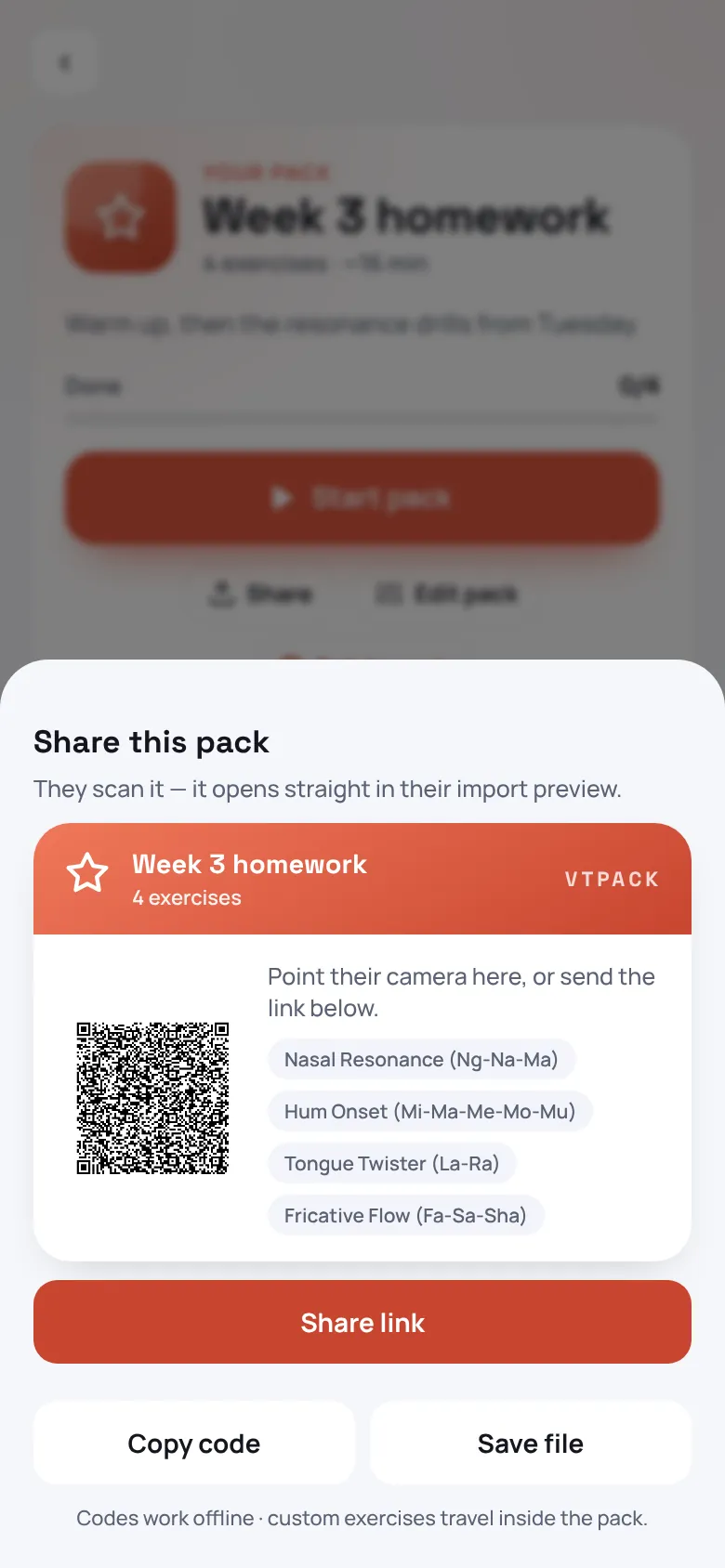
Put the exercises in a pack and press Share. You get a QR code to show on the board or a screen at the end of the lesson, a link for WhatsApp, e-mail or the class chat, and a file. The student opens it, taps Import, and the pack is in their menu with your exercises, in your order.
What your students get
- Live pitch feedback while they sing, and a score for every take.
- Your exercises next to a library of more than 1,400 others, if they want more.
- A streak and a daily goal, so practising becomes a habit.
- Nothing to install: it runs in the browser on a phone, tablet or computer, in nine languages.
What is free, exactly
For you: your first exercise on each instrument (voice, piano, guitar) is free, and so is your first pack. Building more needs a plan.
For a student: importing a pack is free, and the exercises you built play free. A free student keeps one pack of their own at a time, so last week’s pack is deleted to make room for this week’s. Exercises you add from the app’s library follow the student’s plan: on the free plan, a third of every library pack is free and the rest is locked. For homework everyone can play, build it from your own exercises.
What stays private
Nobody is recorded: the pitch is worked out on the student’s device and the sound is thrown away. Students do not need an account. There is also no class dashboard: each student’s results stay with them, so ask them to show you the result screen or send you a progress card from the app.
How it works
Build
Make your exercises in the builder, or pick them from the library.
Pack and share
One pack: a QR code, a link or a file.
Students practise
They import it and practise with live feedback between lessons.
Questions
Do my students need an account?
No. The app runs in the browser without one. An account only keeps progress in sync across devices.
Can I see my students’ scores?
Not in the app: there is no class dashboard, and each student’s results stay with them. Ask them to show you the result screen in the next lesson, or to send you a progress card.
Does it work for piano and guitar students?
Yes. Piano and guitar packs are built from notes you place on a keyboard or from a MIDI file. Piano is scored through the microphone or a MIDI keyboard; guitar is a play-along with tab and a fretboard.
How many packs can a free student have?
One of their own at a time. Deleting last week’s pack makes room for the next one, and a plan removes the limit.
Is anything recorded?
No. The pitch is worked out on the student’s device while they sing or play, and the sound is thrown away.
Which languages does it speak?
English, Slovak, Czech, German, Spanish, French, Italian, Polish and Portuguese, so students can practise in their own language.